Slices in Go.
Go's slice type provides a convenient and efficient means of working with sequences of typed data.

Slices are analogous to arrays in other languages, but have some unusual properties. This article will look at what slices are and how they are used.
Arrays
We cannot talk about slices without talking about arrays. The slice type is an abstraction built on top of Go's array type, and so to understand slices we must first understand arrays. An array type definition specifies a length and an element type. For example, the type [4]int represents an array of four integers. An array's size is fixed; its length is part of its type ([4]int and [5]int are distinct, incompatible types). Arrays can be indexed in the usual way, so the expression s[n] accesses the nth element, starting from zero.
var j [7]int //array of 7 integers
a[0] = 1
i := a[0]
// i == 1
Arrays do not need to be initialized explicitly; the zero value of an array is a ready-to-use array whose elements are themselves zeroed:
// a[2] == 0, the zero value of the int typeThe in-memory representation of [4]int is just four integer values laid out sequentially:

Go's arrays are values. An array variable denotes the entire array; it is not a pointer to the first array element (as would be the case in C). This means that when you assign or pass around an array value you will make a copy of its contents. (To avoid the copy you could pass a pointer to the array, but then that's a pointer to an array, not an array.) One way to think about arrays is as a sort of struct but with indexed rather than named fields: a fixed-size composite value.
An array literal can be specified like so:
b := [2]string{"Penn", "Teller"}Or, you can have the compiler count the array elements for you:
b := [...]string{"Penn", "Teller"}In both cases, the type of b is [2]string.
Try out arrays in this playground
Back to slices
An array has a fixed size. A slice, on the other hand, is a dynamically-sized, flexible view into the elements of an array. In practice, slices are much more common than arrays.
The type []T is a slice with elements of type T.
A slice is formed by specifying two indices, a low and high bound, separated by a colon:
a[low : high]This selects a half-open range which includes the first element, but excludes the last one. The following expression creates a slice which includes elements 1 through 3 of a:
a[1:4]A slice literal is declared just like an array literal, except you leave out the element count:
letters := []string{"a", "b", "c", "d"}A slice can be created with the built-in function called make, which has the signature,
func make([]T, len, cap) []Twhere T stands for the element type of the slice to be created. The make function takes a type, a length, and an optional capacity. When called, make allocates an array and returns a slice that refers to that array.
var s []byte
s = make([]byte, 5, 5)
// s == []byte{0, 0, 0, 0, 0}
When the capacity argument is omitted, it defaults to the specified length. Here's a more succinct version of the same code:
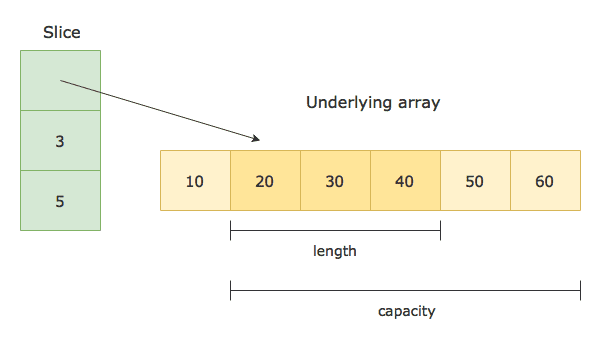
s := make([]byte, 5)The length and capacity of a slice can be inspected using the built-in len and cap functions.
The next two sections discuss the relationship between length and capacity. The zero value of a slice is nil. The len and cap functions will both return 0 for a nil slice.
A slice can also be formed by "slicing" an existing slice or array. Slicing is done by specifying a half-open range with two indices separated by a colon. For example, the expression b[1:4] creates a slice including elements 1 through 3 of b (the indices of the resulting slice will be 0 through 2).
b := []byte{'g', 'o', 'l', 'a', 'n', 'g'}
// b[1:4] == []byte{'o', 'l', 'a'}, sharing the same storage as b
The start and end indices of a slice expression are optional; they default to zero and the slice's length respectively:
// b[:2] == []byte{'g', 'o'}
// b[2:] == []byte{'l', 'a', 'n', 'g'}
// b[:] == b
This is also the syntax to create a slice given an array:
x := [3]string{"shop", "caret", "ebube"}
s := x[:] // a slice referencing the storage of x
You can try it in this playground